
Code review rests on one quiet assumption: that what you see on screen is what the file contains. It's a reasonable assumption right up until someone breaks it.
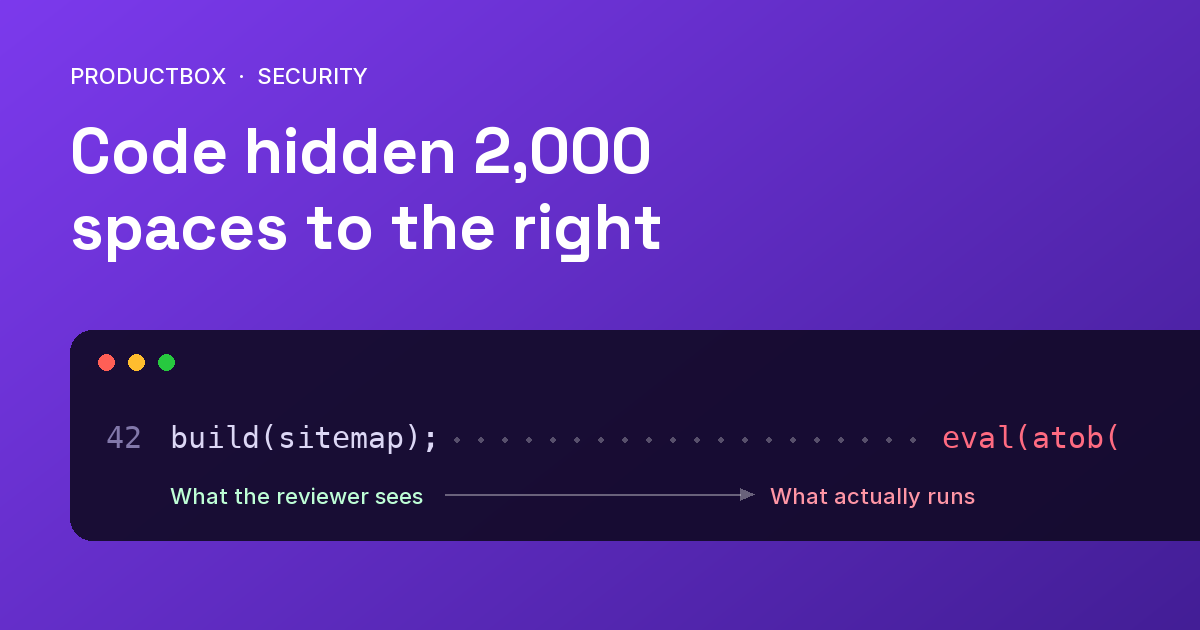
Here is one of the cheapest ways to break it. Take a harmless line of JavaScript, add a couple of thousand spaces, and put the real payload at the very end of the same line. The line looks normal in an editor. In a diff it looks normal too, because nobody scrolls sideways through a file that appears to end at column 30.
We ran into this ourselves, and it changed how we gate our builds. This post covers how the trick works, why it gets past careful teams, and the checks that catch it.
How the whitespace trick works
Nothing about it is clever, which is the point. A JavaScript parser doesn't care how many spaces separate two statements, so this runs exactly as written:
buildSitemap(); [... ~2,000 spaces ...] maliciousCall();On screen you see buildSitemap(); and a clean right margin. Most editors don't wrap long lines by default, and a code review page shows you the start of the line and a thin horizontal scrollbar you have no reason to touch. The payload isn't encrypted or exotic. It's just somewhere nobody is looking.
Attackers tend to put it in the dullest places:
- the last line of a file, where a trailing run of whitespace looks like nothing at all
- small utility or build scripts that few people open and fewer people re-read
- files that sit outside your formatter and linter, which would otherwise reflow the line and expose it
What we found
In October 2026 we found an obfuscated payload appended to the final line of scripts/generate-sitemap.mjs, the script that builds this site's sitemap. It sat after roughly 2,000 spaces, invisible in an editor and in a diff.
That script isn't a one-off tool. It's wired into npm run dev and npm run build, so it runs automatically on developer machines and in CI. We removed the payload and, in the same change, added the guard described below. We're deliberately keeping the payload's details out of this post. What matters for you is the shape of the problem, not the specifics of ours.
The guard we added
The first version was small: a dependency-free Node script of about 40 lines. It reads every tracked source file and fails the build if it finds any of three things:
- A gap in the middle of a line. A non-blank character, then 100 or more spaces or tabs, then another non-blank character. Legitimate code almost never looks like this.
- An implausibly long line. Anything over 2,000 characters in a source file. JSON data is exempt, since long lines are normal there.
- Known payload markers. The strings from the payload we actually found, so a re-injection is caught on sight.
Where the check runs matters as much as what it checks:
- On every pull request and on pushes to
main, so it can be made a required status check. - At the start of the deploy workflow, before
npm ciand before the build. The check needs no installed dependencies, so no package code and no build script has a chance to run before the repository has been inspected. A guard that runs after the build has already executed the payload isn't much of a guard. - Alongside a refusal to deploy after a force-push to
main. Rewritten history is one way to quietly remove a guard or the commit that triggered it, so a force-push means a human verifies the new tip first.
One small detail: the guard script is itself scanned by the guard, and it contains the marker strings it looks for. We build those strings from pieces so the script doesn't flag itself.
It's a family of tricks, not just spaces
Whitespace is one member of a larger family of ways to hide code from human eyes:
- Invisible characters. Zero-width characters, Unicode tag characters and variation selectors can carry data that renders as nothing.
- Bidirectional overrides. Control characters that reorder how text is displayed, so code reads differently on screen than it executes. This is the Trojan Source technique.
- Very long lines and encoded blobs. A few kilobytes of base64 on a single line, followed by something that decodes and runs it.
A check that only looks for runs of spaces would miss most of these. If you're writing your own, plan for the whole family.
Don't want to write your own? Use a tool built for it
I wrote a deeper treatment of this exact problem, 2,000 Spaces to the Right, and turned our guard into an open-source tool, offscreen-scan. It's MIT-licensed, has no dependencies, and ships as both a CLI and a GitHub Action. It flags whitespace gaps, invisible Unicode, over-long lines, large encoded blobs and decode-and-run patterns, and it needs Node 20 or later.
To try it on a repository:
npx github:hassams/offscreen-scanThe hard part, as that write-up explains, is false positives. A naive version of these rules is noisy across real-world dependencies, and a noisy security check gets ignored or switched off, which is worse than not having one. Tuning rules so they fire on hiding, and not on ordinary code, is most of the work.
What a check like this won't catch
These tools find hiding. They don't find malware. Be clear about the limits:
- Obfuscated code on a normal-length line passes.
- A malicious dependency that doesn't hide anything passes.
- A payload fetched from the network at runtime passes.
So treat it as one layer in a defence, not the whole thing.
A practical checklist
If you want the short version to apply this week:
- Add a hidden-code check to CI and run it before installing dependencies or running any build step.
- Make it a required check on pull requests, with branch protection on
main. - Refuse deploys after a force-push to your main branch until someone verifies the tip.
- Scan build scripts and config files, not only application code. They run with the same access.
- Install dependencies with
npm ci --ignore-scriptsin jobs that only need to inspect them. - Give CI least-privilege credentials, so a payload that does run can reach as little as possible.
- Keep a human in the loop. Automated checks catch the mechanical tricks; reviewers catch the rest.
Why this matters more as AI writes more of the code
When AI agents write a growing share of your code, the volume of changes passing through review goes up, and attention per change goes down. Vigilance doesn't scale with that. Deterministic gates do: they check every line of every change, every time, and they don't get tired.
It's part of why our own process, described on How We Work, pairs AI agents with automated guardrails and an engineer's review on every change. If you'd like help hardening your delivery pipeline, our cloud infrastructure team designs and operates CI/CD pipelines with this kind of gate built in, and our case studies show the kind of production systems it protects.